

Learning should help your team grow, work smarter, and feel confident. But for many companies, it can be an uncertain and confusing process. If you’ve ever spent hours looking for the “latest version” of a course or explaining the same things to new hires again and again, you know how frustrating training can be. Instead of helping, it often feels like a waste of time.
That’s why more businesses are turning to learning management systems. An LMS shows employees where to start and helps you manage training without extra effort.
The corporate training market size is growing fast. It’s expected to increase by $43.86 billion between 2024 and 2029, with a CAGR of 7.8%. This dynamics is driven by the rise of e-learning tools and other technological advancements. In short, education is becoming more digital, automated, and effective.
But here’s the catch: buying an LMS doesn’t fix everything. Some companies may even need a custom solution. And without a clear plan, integration can be slow, messy, and expensive. So, how do you set up an LMS the right way?
In this article, we’ll provide a practical LMS implementation checklist and the key requirements you should follow to build an effective learning process for your team.
Core LMS Requirements for Effective Learning Platforms
Before we get into the LMS implementation checklist, let’s talk about what matters when choosing a learning management system. With so many EdTech tools out there, it’s easy to get lost or feel unsure about what to pick.
That’s why having a clear list of LMS requirements helps so much. It cuts through the noise, narrows your options, and points you toward a system that fits your business. Let’s break down these LMS requirements one by one.
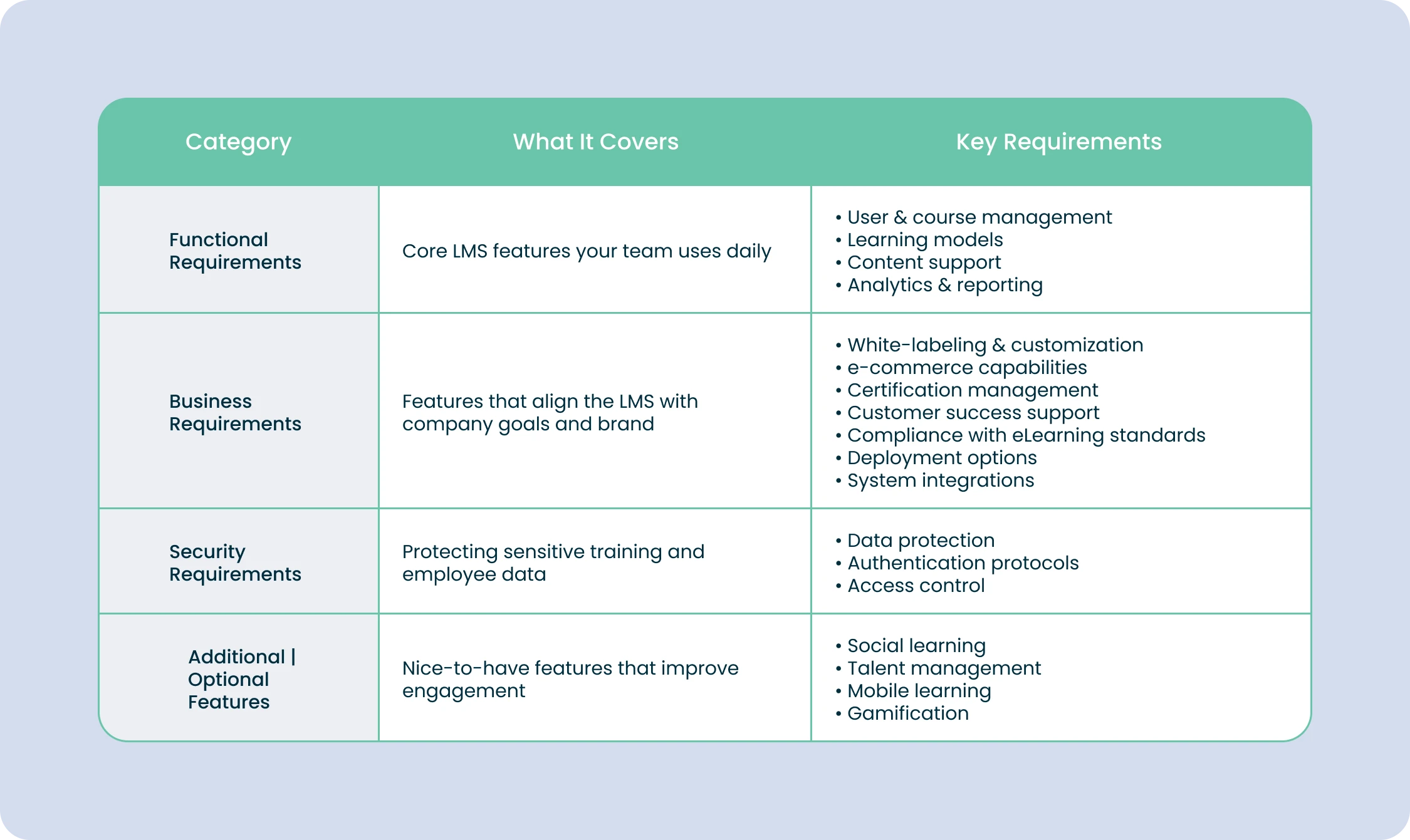
Functional requirements for LMS
Functional LMS requirements cover the core features your team will use every day: managing users, delivering content, tracking progress, and supporting your training.
User & course management
This is your LMS “command center”, where you handle users, courses, and progress tracking. Make sure your system supports:
- Flexible user registration: self-registration or admin-controlled
- Role management: admins, publishers, SMEs, instructors, learners
- Learning paths: separate programs for different teams, roles, or clients
- Easy user import: email invites, Excel uploads, or both
- Automation: reminders, deadline alerts, enrollment notifications
Learning models
Choose the way you want to deliver training. Your LMS should support:
- Pure e-learning (fully online courses)
- Blended learning (mix of online and in-person)
- Instructor-led training (classroom or virtual sessions)
- Webinar tools: built-in or via integration (Zoom, Teams, etc.)
- Classroom management: scheduling, locations, attendance tracking, instructor assignment
Content creation & formats
Your LMS should work with the content you already have and help you create more.
- Supported formats: PDFs, videos, audio, docs, SCORM, AICC, xAPI
- Authoring tools: built-in editors or integrations with tools like iSpring Suite
- Easy updates: quick editing and version control for existing courses
Analytics & reports
Decide how much insight you need from your LMS:
- Basic reports: user progress, course completion, scores
- Advanced analytics: custom dashboards, templates, charts, and drill-downs
- Insights for improvement: big data in education to refine content and boost training effectiveness
Business requirements for LMS
Now let’s focus on the LMS business requirements. These are the features that help your training system match your company goals, brand, workflows, and long-term strategy.
White-labeling and customization
- Match the LMS interface to your corporate branding (colors, logo, dashboards)
- Customize different dashboards for admins, trainers, and learners
- Full redesign, custom domain, and branded mobile apps are possible in some LMSs (may cost extra)
Ecommerce integration
- Sell courses and training materials directly through the LMS
- Integrate with platforms like Shopify to manage pricing, promotions, sales, and revenue
Trainee certification
- Automatically issue certificates after course completion
- Useful for employee incentives or certification programs sold as a service
Customer success support
- Access to prompt technical support for smooth implementation
- Customer success managers help customize the LMS, solve issues, and optimize usage
Compliance with e-learning standards
- Ensure content works across platforms and devices
- Look for SCORM (1.2, 2004), AICC, xAPI, or other standard support
Deployment options
- Hosted LMS: Data stays in-house, high security, requires IT resources, setup can take 3-6 months
- Cloud LMS: Ready to use, scalable, accessible from anywhere, ideal for remote teams
Integration with other systems
- Connect with HR software, CRMs, BI tools, and authoring platforms
- Examples: automatic user data migration, ACCME integration for healthcare training programs
LMS security requirements
Many leaders still feel that remote work opens the door to more security risks, which makes protecting sensitive data in your LMS more important than ever. Your LMS holds everything from employee records to customer details and internal know-how. So solid security features are essential if you want to avoid leaks or full-on breaches.
Sensitive data protection
- Safeguard confidential information from unauthorized access or misuse
- Ensure encryption protocols meet industry standards (GDPR, HIPAA, PCI DSS)
- Look for tools like data anonymization, secure storage, and audit trails
Authentication protocol
- Verify users securely using methods like username/password, single sign-on (SSO), or multi-factor authentication (MFA)
- Protect the platform from unauthorized access and maintain learning environment integrity
- Make sure the LMS meets your company’s authentication standards
Access control
- Define permissions and restrictions based on roles and organizational hierarchy
- Control who can view or interact with specific content and LMS features
- Use role-based access settings to streamline workflows and protect critical data
Other important LMS standards and requirements
Learning platforms offer many extra features. Some can support your goals, while others may be unnecessary. Here are popular optional features you may find useful:
- Social learning: If you want employees to share knowledge and interact, look for an LMS with social tools. These features let people post content, join discussions, and support each other, similar to social media.
- Talent management: If skill development is your priority, choose an LMS with competency tracking. It helps you set required skills, build focused learning paths, and monitor each employee’s growth.
- Mobile learning: For teams that work on the move, pick an LMS that supports responsive courses or has a mobile app. Offline access is especially helpful for employees who travel often.
- Gamification: To make learning more engaging, look for a platform that includes badges, points, leaderboards, or rewards. These small game elements help motivate learners and keep them involved.
As you can see, there are quite a lot of LMS requirements to keep in mind. The more carefully you follow them, the better your learning platform will perform and the more effective your training will be. You can always adapt these requirements to your business needs by removing unnecessary features or adding the ones that matter most.
Need an LMS that actually works?
Contact Forbytes, and we’ll help you define your unique requirements, choose the right solution, and implement it wisely.
LMS Implementation Checklist Developed by Our Experts
Before choosing a learning management system, we recommend using our LMS implementation checklist that guides you step by step. The whole idea is simple: understand what you need, prepare the right people, and launch in a way that feels natural for your team. Still, it’s important to pay attention to every stage of the process to make your implementation truly successful.
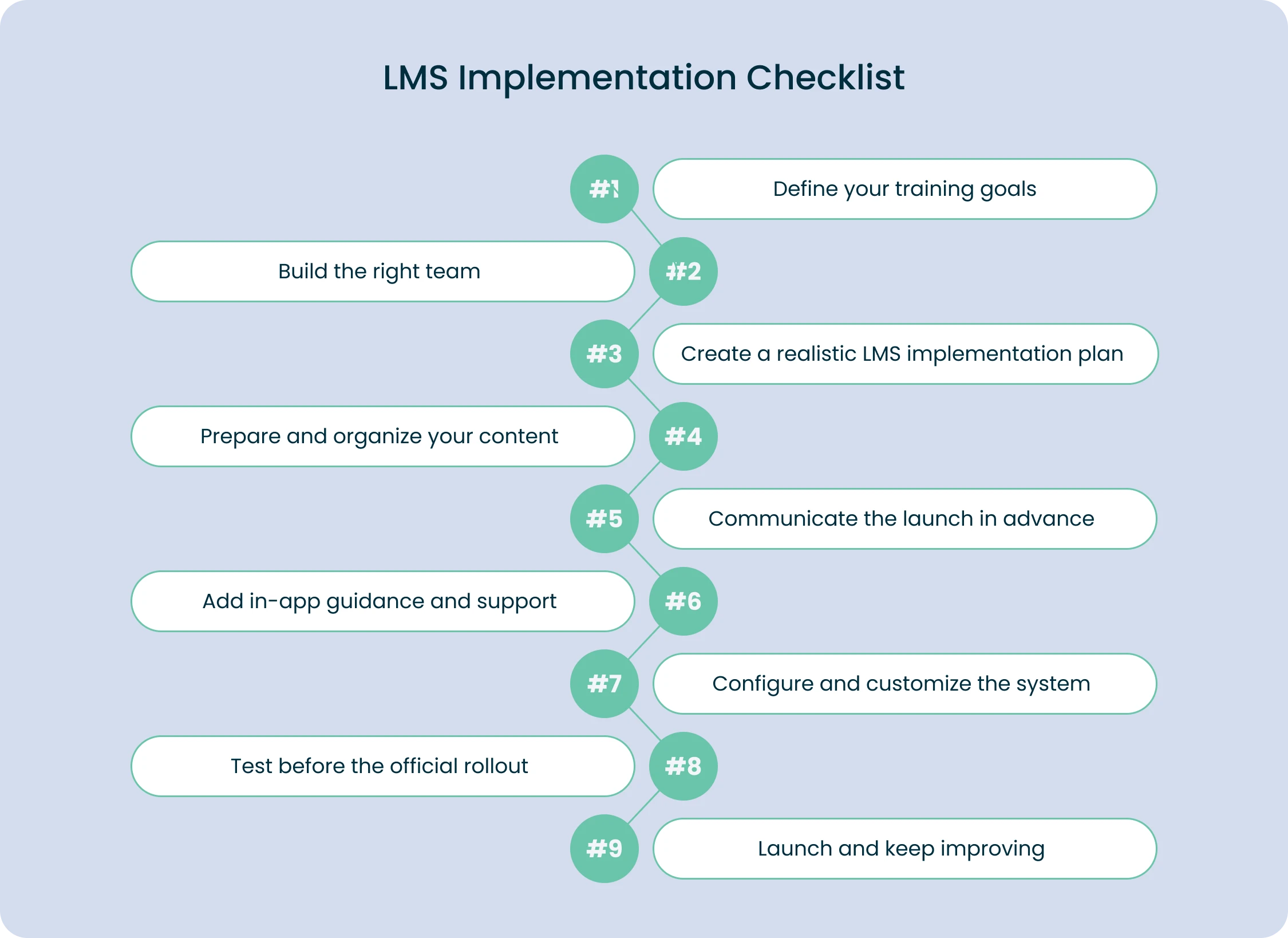
Step 1. Define your training goals
Start by defining your training objectives and understanding why you’re introducing an LMS to the company. Whether you’re switching from another system or launching e-learning for the first time, you need clarity on what you want to achieve. Align these goals with stakeholders early so everyone has the same expectations.
Step 2. Build the right team
Next, build your LMS implementation team. This usually includes HR, L&D, IT, content creators, designers, or external experts if needed. What matters most is giving each person a clear role and making communication easy so the project moves without delays.
Step 3. Create a realistic LMS implementation plan
Once your team is ready, create a realistic implementation plan. Set a launch date, outline the timeline, and break the work into phases. Decide whether you’re migrating existing training materials or building new ones, and make sure your plan includes time for integrations and testing.
Want to make LMS selection easy? Download our full checklist and start working on your LMS right now.
Get Pdf
Step 4. Prepare and organize your content
When it comes to content, keep things organized. If you’re migrating, clean and structure your data first so everything transfers smoothly. If you’re creating new content, make sure it fits the formats your LMS supports. This part takes time, but it pays off later with fewer errors and a better learner experience.
Step 5. Communicate the launch in advance
Now it’s time to prepare your users. Communicate the upcoming launch, share updates, and consider a short demo or internal announcement to build interest. A phased rollout often works best because you can test with a smaller group, catch issues early, and improve before everyone starts using the platform.
Step 6. Add in-app guidance and support
Your LMS also needs built-in help and guidance. Make sure users can easily find tutorials, instructions, or support contacts right inside the system. This reduces frustration and helps new employees get comfortable quickly.
Step 7. Configure and customize the system
After that, you can move on to the technical setup. Customize the system to match your brand, add user roles, connect it with HR tools, enable SSO, and configure permissions. This usually requires more technical involvement, so plan it during low-impact hours to reduce downtime.
Step 8. Test before the official rollout
Before the official launch, run a full test. A small pilot group is usually enough to help you verify logins, content display, integrations, and overall usability. Collect feedback, make improvements, and get everything ready for the final rollout.
Step 9. Launch and keep improving
Finally, launch the LMS and support your learners through the first weeks. Keep gathering feedback, adjust the system, update the content, and improve workflows. LMS implementation isn’t a one-time task, it’s an ongoing process of making learning easier and more engaging for your team.
With a clear plan, the right people, and proper testing, LMS implementation becomes much less complicated than it seems. Follow these steps, adapt them to your needs, and you’ll build a learning system that actually works for your organization.
Practical LMS Implementation Tips to Keep Your Training on Track
Now that you know how to implement LMS, we’d like to arm you with some tips that can make the integration process even more effective and help you achieve better results. Think of these tips as your shortcut to creating training that feels natural, friendly, and worth their time.
- Add gamification elements: Start by adding gamification. A few badges, challenges, and friendly leaderboards can turn “mandatory training” into something people want to complete.
- Use interactive content: Make your content interactive. Videos, quizzes, and simulations keep learners curious and help them understand complex topics much faster.
- Personalize learning: Personalization keeps users engaged. Everyone learns differently, so give them content that fits their pace and skill level.
- Enable social learning: Discussions, chat spaces, and knowledge-sharing groups make the platform feel alive, not static.
- Ensure the LMS works on mobile devices: Since people learn on the go, make sure your LMS works perfectly on mobile devices.
- Use microlearning: Create short, focused lessons, and you’ll match the rhythm of real workdays.
- Provide support tools: FAQs, guides, and chatbots can be used for quick help.
With these simple steps, your LMS turns into a living learning ecosystem where people feel supported and motivated. It creates a space where learning feels natural, progress is visible, and your team can develop new skills without stress.
Common LMS Implementation Mistakes We Want to Warn You About
Setting up an LMS can be exciting, but there are a few common mistakes that can slow everything down. If you know about them in advance, the whole process becomes much easier and smoother.
One big mistake is skipping the needs assessment. If you start building an LMS without understanding what your team actually needs, you’re almost setting yourself up for failure. When you take time to define your goals, user preferences, and essential features, you’ll end up with a system that truly works for you.
Another common issue is the lack of training for your users. Even the best LMS won’t help if people don’t know how to use it. Make sure everyone gets simple, clear training and knows where to go when they need support or answers.
Content planning is another thing many teams overlook. Without a proper content strategy, the platform quickly becomes messy and hard to navigate. Keep your materials organized, updated, and aligned with your learning goals.
Low engagement is another pitfall. If your LMS feels boring or too static, people won’t use it. Add interactive elements, short tasks, social features, and fun challenges to keep learners active and motivated.
The last mistake is ignoring your results. Feedback, progress tracking, and small improvements over time are what turn a good LMS into a great one. Regular check-ins help you fix issues early and make the experience better for everyone.
And if all this sounds overwhelming, you can always rely on a professional team that will help you avoid these mistakes from the very beginning.
How Forbytes Accelerates LMS Integration for Your Business
Implementing an LMS can feel overwhelming, but it doesn’t have to be. At Forbytes, we make the process smooth and straightforward. We help you choose the right system, migrate content, set up integrations, customize features, and train your team.
We begin by understanding your goals and workflows, so the LMS fits into how your team works. By planning each step and avoiding common pitfalls, we ensure your employees have a seamless learning experience from day one.
If you want an LMS that’s easy to use, efficient, and tailored to your business, contact Forbytes today.