



What if there were a software fix that would save up to 40% of your IT budget? We are glad to tell you there is actually one.
Deloitte’s 2026 Global Technology Leadership Study estimates that technical debt takes up 21% to 40% of an organization’s IT spending. In short, it means that the budget goes to keeping legacy software functioning and dealing with all the issues legacy systems cause.
When you modernize applications, you get:
- data connected automatically between different systems and available for users in real-time;
- current security protocols, multi-factor and biometric authentication, and data encryption in place
- reduced downtime and infrastructure management costs
So the initiative will pay off in faster releases, lower maintenance costs, and systems ready for AI. The hard part is getting there while the business keeps selling, booking, and shipping.
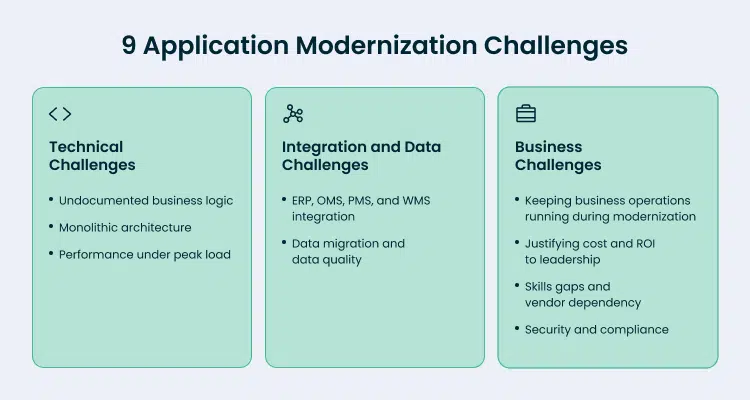
In this guide, Forbytes covers 9 application modernization challenges that companies in retail, travel, and logistics face. For each one, you get the modernization strategies our team applies in its own projects and a client case where it delivers results.
Application Modernization Challenges at a Glance
Use this table to find the challenges closest to your situation, then go to the section with the full solution. The middle column shows where the business usually feels each challenge first.
Technical Challenges That Shape Your Legacy Modernization Plan
Technical challenges set the pace of the whole modernization process. Teams that solve them early make every later step cheaper and safer.
1. Undocumented business logic in legacy code
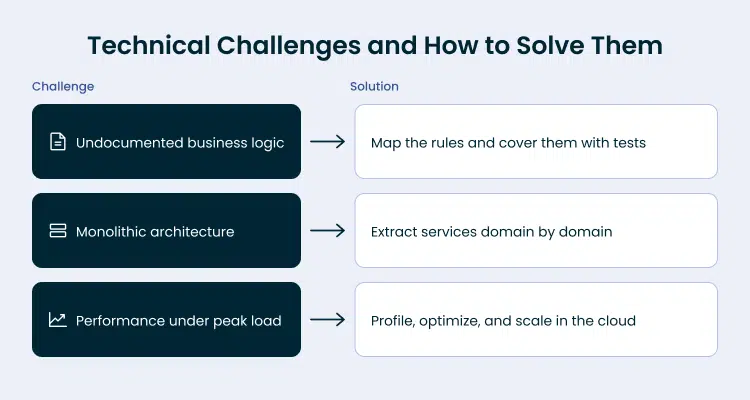
Your legacy system has a lot of business rules that have been built up over the years, like how discounts work and how rates are calculated. The goal is to carry every rule into modern systems intact. The usual picture is when rules live only in the code, written by engineers who left the company years ago.
Forbytes suggests planning out the logic before making a move. Engineers go through the code step by step, figuring out what each section does and what it relies on. They make a list of all the dependencies. Then, they create automated tests for each rule they’ve pulled out. This way, the team can be sure the new version works just like the previous one.
Nowadays, using AI can optimize this process and reduce mistakes when experienced developers are in charge. Take the Guesty project, for example, where Forbytes engineers used AI tools to figure out what old, undocumented code did and what it relied on. The engineers then reviewed the results, made the final calls on what to keep and how to move forward.
2. Tightly coupled monolithic application
Product teams want to transform one part of the platform without retesting everything else. When you own a monolithic application, it becomes hard. The single shared codebase lets a single change affect three (or even more) different modules.
The solution here is what we call incremental modernization, often called the Strangler Fig pattern. Here’s how it works: your team chooses one area to focus on, then the engineers break out its logic into a separate service that has its own API. From there, they redirect the traffic to the new service and get rid of the old code for that particular area. Then the cycle repeats. And your platform stays up and running the whole time.
Guesty, a property management platform, ran many core services on an outdated version of Node.js, kept in a single repository with no TypeScript. Forbytes team:
- split the monolith into logical domains;
- refactored the logic into TypeScript;
- moved each part into a new microservice with fresh endpoints;
- released it after testing.
So Guesty ended up with a distributed architecture, making it easier for developers to test more thoroughly. This also meant they could get new features out to people faster.
3. Performance limits under peak load
When the conversation is about Black Friday, summer booking season, or Q4 shipping peaks, you immediately associate those seasons, most probably, bringing your highest revenue. Only if your system is flexible enough to stay fast under that traffic.
Typically, we recommend starting with profiling. Engineers identify the requests, tasks, and services that consume the most resources under load; optimization begins with these specific elements. Common troubleshooting measures include implementing caching, incremental data processing, and modernizing infrastructure — leveraging cloud computing to scale up during peak loads and scale down afterward.
Forbytes worked with the WeSports Group, a Scandinavian company that specializes in sports equipment. They had bought an online store called Spobik, which relied on an unstable platform that required an external vendor for every update.
Forbytes was able to keep the existing features, move the store to a new platform called OpenMage from Magento 1, switch the infrastructure to AWS, and implement incremental indexing. This meant that only the items that had changed were updated during catalog changes.
As a result, the time it took for pages to load got much faster – from 600 milliseconds to just 38 milliseconds. The Largest Contentful Paint metric also improved, taking only 0.24 seconds. And now, updating over 500,000 products takes around 10 minutes.
See Where Technical Debt Slows Your Releases
Forbytes engineers audit your architecture, code, and dependencies and show which modules to modernize first.

Integration and Data Challenges
Every legacy system is part of a bigger network. It connects to ERP, order management, warehouse, and booking tools to exchange data with them every minute. How well these tools share information and work together determines if the new setup will work smoothly with everyday business tasks.

4. Connecting legacy systems with ERP, OMS, PMS, and WMS
The goal is one accurate flow of data between the legacy core and every tool around it. The problem is, legacy systems use different ways of formatting data, outdated communication methods, and direct connections that aren’t well documented.
You can create a bridge between old and new systems with an API integration layer around the legacy core. This is where middleware or an integration platform (iPaaS) comes in. They convert data into the right format and handle any errors that come up. For high-volume flows such as stock updates, event-driven architecture keeps every system current. This setup lets you replace parts of the legacy system later while integrations stay stable.
Home Furnishing Nordic (HFN), a large retailer, needed its custom systems to work with three different warehouse management systems, the Svea payment platform, and Microsoft Dynamics NAV. So, we came up with a plan: we would build integrations using APIs for the warehouse management systems, connect the ERP system using SOAP, and make sure all the data formats were the same across all systems. Forbytes’ team was working with limited information and documentation from third-party providers, but we delivered the desired result: HFN now runs 100% daily financial data sync and real-time stock updates across all systems.
5. Data migration and data quality
Your order history, guest profiles, and shipment records hold years of business value. A successful data migration makes sure all of this information is moved to the new system completely and correctly.
Legacy data often has copies, outdated formats, and fields that have different meanings in different parts. Forbytes suggests three practices for data migration:
- Start by cleaning and mapping the data. Take a close look at where the data is coming from, get rid of any duplicates, and make sure everyone is on the same page about what each field means before making any changes.
- Migrate in phases. Start with the lowest-risk data, then work your way up. Move one domain or set of data at a time.
- Run both systems in parallel. The automated reconciliation tool checks the records in the old system and the new system, and it keeps doing this until the numbers match.
Large catalogs need help getting data in automatically. The team at Spobik had a problem: they had a lot of product info to update. Forbytes stepped in and created a new way to import data quickly, so the team didn’t have to do it by hand.
Business and Organizational Challenges
Leadership backs a modernization effort when it protects revenue, fits the budget, and keeps the company in control of its platform. These four challenges decide whether a modernization project gets funded and finished.
6. Keeping business operations running during modernization
Your stores and booking systems need to keep running smoothly even when engineers are making changes behind the scenes. A single big release puts the whole business at risk in one day.
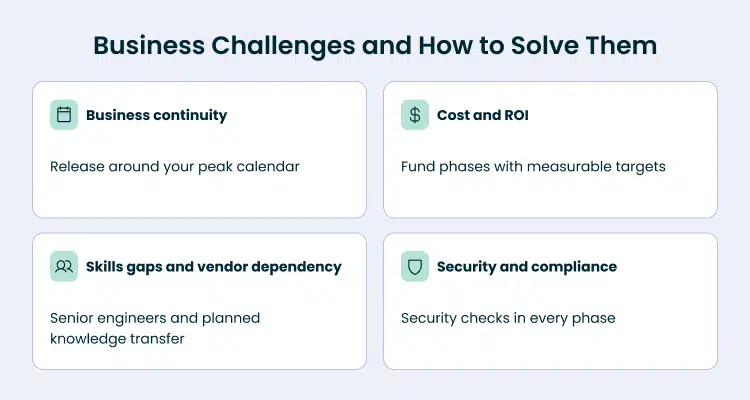
Forbytes plans releases around the client’s business calendar. Major changes go live outside peak seasons. We try out new features with a small group first. This way, if something goes wrong, our team can easily switch back to the previous version, and every phase ships with a rollback plan.
7. Justifying cost and ROI to leadership
To get a modernization project off the ground, you need to have a budget in place. But to get that budget approved, you need a solid business case to back it up. The people in charge want to see a clear timeline for first real results, and they also want to know what they can expect to get out of each phase of the project.
Forbytes suggests funding modernization in phases. First, you need to prioritize each part based on how much it affects your business and how risky it is. Start with the parts that are causing the most problems, like slow updates or downtime. Set clear goals for each step, such as how often you release updates, how fast your pages load, how many hours of manual work you save, or how many support tickets you get. By working in short cycles and showing progress quickly, you can build a strong case for moving on to the next step.
Sometimes the cheapest path is to connect a ready-made tool. For HFN, it was better to use tools that already existed. They found it was quicker and cost less to add third-party services rather than create every single feature from the ground up in their own systems.
8. Skills Gaps and Vendor Dependency
Your team should be able to run the platform their way. But this single requirement gets harder to satisfy when the people who built the system are gone, or when no one in your company understands the old technology, or when you have to rely on someone outside the company to make every change.
Forbytes puts experienced engineers on modernization projects. Our engineers are familiar with legacy systems and new software development methods. They work closely with the client’s team, partnering with the in-house developers, and making sure to share knowledge and document everything as part of the project.
Before the project, any technical change on Spobik depended on an external vendor. After the upgrade and migration, WeSports Group gained full technical control of the store.
9. Security and Compliance Gaps
Payment data, guest records, and customer profiles need protection that passes every audit. Legacy software often runs on outdated packages that no longer receive security patches.
Forbytes makes sure to include security in every step of the update process. When we break down a service, our developers give it the latest dependencies, secure login, and access controls based on roles. We also consider rules like PCI DSS for credit card payments and GDPR or UK GDPR for customers in Europe from the very beginning of the design phase.
The Guesty project got a big update, which meant getting rid of old code and dependencies that were no longer needed. This helped make the services more secure. At Spobik, the team at Forbytes made some changes too. We added security measures to keep out fake traffic from bots, which helped the system run more smoothly.
Keep Every Integration Running While You Modernize
Forbytes maps your ERP, OMS, PMS, and WMS connections and designs an API layer that lets each module move on its own schedule.
How These Challenges Differ by Industry
Each industry has its own set of challenges, and they don’t all carry the same importance. So, use this part to figure out which ones should be your top priority when updating your company’s systems and technology.
Retail and Ecommerce
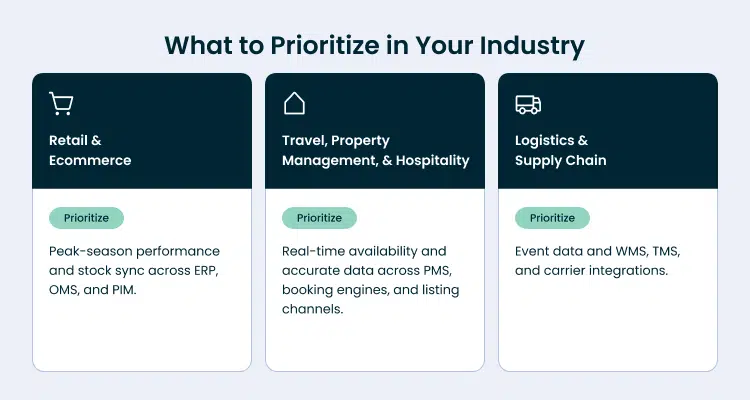
Online shopping sites have to deal with a lot of ups and downs in terms of traffic and they also have huge product lists. When it comes to priorities, performing well during peak seasons, making sure stock levels are the same across different systems, and handling multiple stores are at the top of the list.
To make things easier, many retailers are now using a flexible approach to building their online stores, which allows them to update one part at a time. We can see this approach in action with projects like Spobik, H&H Group, and HFN, which all focus on these key areas.
Travel, Property Management, and Hospitality
For travel and property management platforms, having real-time availability is crucial. This is because things like reservations, rates, and messages from guests are constantly being shared between different systems, like the property management system, booking engines, and listing channels, every single second.
So, it’s really important that these systems are integrated accurately and are always up and running. Also, being able to access these systems on mobile devices is a big deal, since property teams often need to manage things while they’re away from their desks.
Logistics and Supply Chain
Logistics platforms are all about what happens when something changes, like when a customer places an order, a package is picked up, scanned, or delivered. How well the system interacts with other tools, like WMS and TMS, and how it connects with carriers, uses EDI, and tracks packages, really matters for how quickly the business can react. The way the system is built to handle these changes and the quality of the data it uses are top priorities.
Choosing a Modernization Approach Without a Full Rewrite
Most portfolios need a combination of updates. It depends on how good the basic idea is and how much the current system holds you back. Each choice changes the old code in a different way:
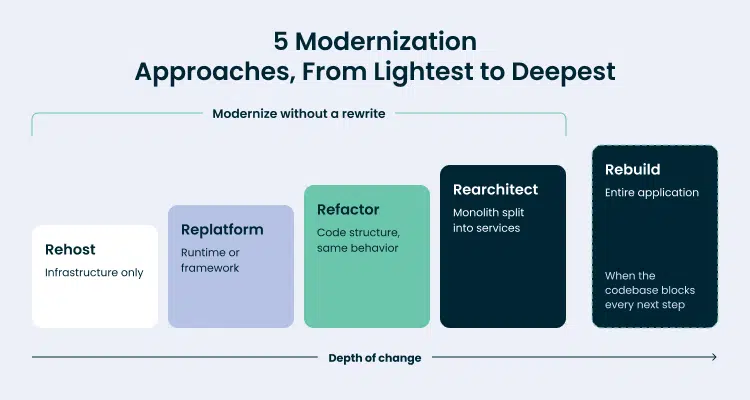
- Rehost: move an on-premises application to cloud-based infrastructure with minimal code changes.
- Replatform: upgrade the runtime or framework while keeping the functionality.
- Refactor: clean and restructure the code while keeping its behavior.
- Rearchitect: split a monolithic application into cloud-native services, domain by domain.
- Rebuild: write a new application from scratch.
Forbytes takes a straightforward approach to solving problems, starting with the simplest solution. When Spobik needed to improve their speed and stability, Forbytes achieved this by replatforming and migrating to the cloud.
Sometimes a complete rebuild is necessary, especially when the existing code is holding everything back. This was the case with Guesty’s mobile app, which was essentially a wrapper around a web app built using outdated Ionic code. To tackle this, Forbytes’ team broke down the process into manageable phases: first, we integrated the app with Guesty’s backend; then developers rewrote the core views using React Native; and finally, we did a full rebuild using React Native. The end result is an app that now serves 20,000 users, offers three times more features than before, and has reduced bug-related support tickets by 80%.
A Risk-Reduction Checklist for Your Modernization Project
Here’s how you can turn unknowns into decisions your team can make before starting work. These decisions add up to a plan to update your system that you can budget for, pay for, and keep an eye on. Forbytes suggests you make all these decisions before making any changes to the code.
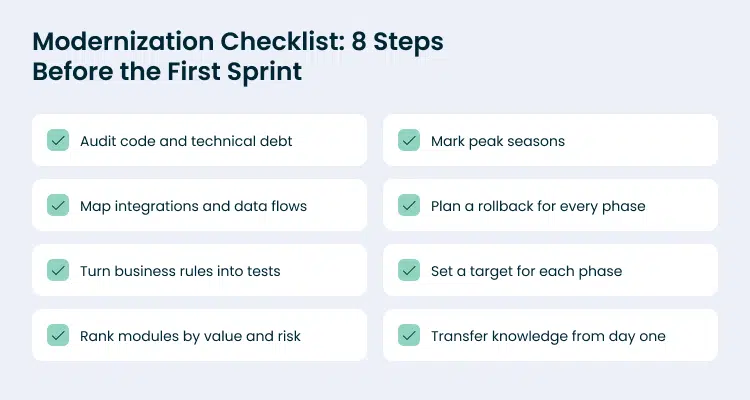
1. Audit the Architecture, Code Quality, and Technical Debt
Get a complete view of what you’re updating. Look at the overall design, the tools and software you’re using, how well your tests cover everything, and how you’re setting things up. Next, use static code analysis and version control history together. You’ll see that parts of the code that change a lot and often cause problems are where you’re wasting the most time.
You get a clear picture of what’s going on with your code, and a plan that tackles the biggest obstacles that are slowing you down. From day one, your team knows what to expect and can work around the roadblocks that have been holding you back.
2. Map Every Integration and Data Flow
List every system the legacy application exchanges data with. It should include ERP, OMS, PMS, and WMS. For each of these connections, your development team will need to write down a few details: which way the data goes, how often it happens, what format it’s in, what protocol it uses, and who’s in charge of it. Don’t forget the ones that are easy to miss, like jobs that run automatically, files that get sent through FTP, exports that happen at night, and spreadsheets that someone manually updates.
You get a clear picture of how everything fits together, which helps you figure out the order of things. This map shows you which parts can work on their own and which ones need a little extra help from an API layer first. For example, in the HFN project, this mapping helped Forbytes make all the data formats match up across three different warehouse systems, an ERP, and a payment platform – and they did it even with limited information from third-party sources.
3. Extract Undocumented Business Rules Into Automated Tests
Before making any changes to the current system, it’s essential to understand how it works. To do this, engineers create tests that show how the system responds to different inputs, like final prices, discounts, and delivery routes. They use production logs to come up with test scenarios. The operations team helps identify unusual cases, such as special holiday rates or bundle pricing, that might not be well-documented. AI tools can quickly scan through code, and engineers carefully review every rule to confirm it’s correct before turning it into a test. This way, they can ensure that the new system behaves as expected.
What you gain: a safety net for refactoring. Your CI pipeline catches any change in business behavior before customers see it, and the tests serve as living documentation for the next team that works on the code.
4. Rank Modules by Business Value and Risk
Evaluate each part of the project using two main criteria. First, look at how much it affects the business, including how much money it brings in, how it impacts customers, and how much work it takes to maintain. Then, consider the technical risks, such as how connected it is to other parts, how sensitive the data is, and how easy it is to test. Begin with the parts that score high in terms of business value but moderate in terms of technical risk. Save the core parts that are most prone to problems for later, after the team has tried out its methods and tools on smaller, less critical components.
You get to see real progress right from the start, which builds leadership confidence and secures funding for the next one. Your engineers can learn the basics of the code in a safe area before diving into the more tricky parts.
5. Mark Peak Seasons on the Release Calendar
Plan a shared calendar with the people who make business decisions. For stores, this means marking down Black Friday, holidays, and big sales. For travel companies, it’s summer vacations and holiday bookings. For delivery companies, it’s the last quarter of the year and the end of each month. Make sure to do big updates when things are slow and test new parts before they get busy.
6. Prepare a Rollback Plan for Every Phase
To avoid problems when making changes, set clear rules for when to go back to a previous version. This plan can be useful when there are too many errors, slow response times, or a big drop in conversions. Decide who will make the decision to roll back. Make sure the old version is still available, either by using blue-green deployment or feature flags, and practice rolling back in a test environment. Be especially careful with changes to data: plan to write data in two places or have a way to compare the two versions, so both are usable.
You get a regular flow of updates. When fixing a mistake is easy and straightforward, your team can make smaller changes more frequently, which means less chance of something going wrong.
7. Set a Measurable Target for Each Phase
Start by setting a baseline before you begin. Then, link each stage to something the business really cares about, like how long it takes for a page to load, how often you release updates, how long it takes to make changes, how many incidents happen, how many hours are spent on manual work each week, how many support tickets are opened, or what the infrastructure costs. After each stage, look at the results and adjust your plan based on what the numbers tell you.
You get a clear picture of what’s working and what’s not. Leaders can see how things are going step by step, and if something’s not going as planned, your team can make changes quickly. This whole process is based on real numbers, so you can have informed conversations about return on investment.
8. Plan Knowledge Transfer From Day One
Pair external engineers with in-house developers on every module. Record architecture decisions as they happen, and include runbooks and API documentation in the definition of done for each task. Rotate in-house developers through the new services so knowledge spreads beyond one or two people.
What you gain: full ownership of the modernized platform. Your team runs and extends the new architecture on its own, and new hires onboard faster. At Spobik, WeSports Group moved from depending on an external vendor for every change to full technical control of its store.
Your Next Step
Every challenge in this guide has a solution that works while your platform stays live. Whether you plan app modernization for a US store or application modernization for a UK booking platform, the first step is the same: an audit that shows which challenges apply to you and in what order to solve them. Forbytes runs that audit and turns it into a phased modernization roadmap.
FAQ
What is application modernization?
Application modernization is the process of updating legacy applications so they run on current architecture, frameworks, and infrastructure and match today’s business needs. The process of updating legacy applications can include code refactoring, framework upgrades, application migration to the cloud, splitting a monolithic application into smaller services, and new integrations with ERP, OMS, or WMS systems.
The benefits of application modernization include faster releases, lower maintenance costs, stable performance under peak load, stronger security, and a codebase ready for AI tools. Legacy application modernization works best as a phased program, where each phase delivers a measurable result while the existing application keeps serving customers.
What are the main application modernization challenges?
Application modernization challenges fall into three groups.
- Technical challenges include undocumented business logic, tightly coupled monolithic architecture, and performance limits under peak load.
- Integration and data challenges cover connections with ERP, OMS, PMS, and WMS systems and data migration.
- Business challenges include keeping operations running, justifying cost, closing skills gaps, and meeting security and compliance requirements. These common challenges carry different weight in each industry. Retailers tend to put peak-season performance first, travel platforms put real-time availability first, and logistics companies put event data and carrier integrations first. Mapping your legacy challenges to business impact at the start of the application modernization journey shows which ones to solve first.
How long does an application modernization project take?
The timeline of legacy app modernization depends on system size, the number of integrations, data volume, and the chosen modernization approach. A framework upgrade of one application takes far less time than rearchitecting a large monolith, which runs in phases.
With incremental modernization, Forbytes aims to deliver the first improvements within weeks and continues the modernization journey phase by phase, each with its own scope, target, and release date. An initial audit turns these factors into a modernization roadmap with fixed milestones, so you know when each result arrives before the first sprint starts.
Can you modernize a legacy application without rewriting it?
Yes, we can. You can modernize your legacy applications through replatforming, refactoring, and gradual extraction of services while the existing application keeps running. A common approach to application modernization is the Strangler Fig pattern. The team moves one domain into a new service, routes traffic to it, and retires the old code for that domain, then repeats the cycle.
Step by step, this transforms legacy systems into modern, scalable applications through a series of small, low-risk releases. A full rebuild makes sense only when the current codebase blocks every next step, for example, when outdated applications run on a framework that no longer receives updates. Even then, Forbytes recommends moving in phases.
Which application modernization patterns work best for legacy systems?
The right pattern depends on what limits your system today. Strangler Fig suits monolithic platforms because it splits the application into smaller services one domain at a time. An API layer suits legacy cores that must keep running while new systems connect to them. Event-driven architecture suits high-volume flows such as stock updates and shipment tracking. Replatforming suits systems with sound business logic on an aging runtime. Automated modernization tools, including AI code assistants, speed up updating legacy code: they read undocumented logic, map dependencies, and draft refactored code.
Engineers review every output and decide what goes to production. Most projects combine several application modernization patterns across one portfolio.
How do you modernize a legacy system without downtime?
Release changes in small increments, outside peak seasons, and behind feature flags. Feature flags switch new functionality on for a small group of users first, so the team checks behavior on real traffic before a full rollout. Blue-green deployment keeps the previous version ready, and a rehearsed rollback plan covers every phase.
For application migration that involves data, run old and new components in parallel and compare results through automated reconciliation until the numbers match. This way, you transform your legacy systems while customers keep shopping, booking, and tracking orders.
How do you measure the ROI of application modernization?
Record a baseline before application modernization starts, then track the same metrics after each phase. Useful metrics include release frequency, lead time for changes, page load time, uptime, incident count, infrastructure costs, manual hours per week, and support ticket volume. Compare each phase’s results with its cost to see which parts of the program pay back fastest.
A successful application modernization strategy links every phase to one or two of these metrics from the start. A robust application modernization strategy also counts indirect gains, such as faster onboarding of new engineers and readiness for AI tools. As a modernization partner, Forbytes sets the baseline during the audit, reports results after each release, and adjusts the roadmap when the data calls for it.
Share:
-

-
-
Successfully copied
-


Daryna Hanhur
Content Writer
My role is to make Forbytes’ expertise, which spans over a decade, noticeable to others. I believe that good content should make one thing clear: how the team solves real problems. That is why, as a content writer, I focus on highlighting the business value of Forbytes’ projects, the technologies used, and the challenges overcome.






Let's Get in Touch


Forbytes created an app that allowed users to quickly measure themselves to be fitted for custom shirts. As a result, we could increase our speed, quality, and shirt output per week. Forbytes was dedicated to delivering a solution that accurately addressed our needs.

Forbytes’ engineers and team leads worked as part of our RnD group and were directly managed by our company directors. They were both proactive and adaptable, qualities that perfectly match our needs in our fast-growing and constantly evolving environment.
Forbytes has a strong process-oriented way of leading the company, with good respect for themselves and their managers. They made a choice not to become too big but build slowly on more qualified people, which is paying off.

Niklas Hammar
COO & Business
Development at Offerta.se

Our e-commerce site saw online inquiries and orders rise after working with Forbytes. The team used top-notch expertise to inform their suggestions and improvements. Constant communication, quick responses, and prompt delivery made for a smooth and enjoyable collaboration.

The Forbytes team was very professional and demonstrated a great understanding of the business aspects. All tasks were completed above expectations. Their experts were always available, and we never needed to wait for a response or a suggested solution.